---
title: Add items to your inventory and list them on a storefront
description: This guide walks you through adding items to your inventory, managing digital documentation, and listing items on your storefront.
---
[Skip to content](https://support.arcual.art/add-artworks-to-your-inventory-and-list-them-on-a-storefront#main-content)
[](https://support.arcual.art/?hsLang=en)
Open main navigation
Close main navigation
- [Arcual.com](https://www.arcual.com/)
[Arcual.com](https://www.arcual.com/)
How can we help you?
- There are no suggestions because the search field is empty.
1. [Help Center](https://support.arcual.art/?hsLang=en)
2. [Storefronts for galleries and artists](https://support.arcual.art/storefronts-for-galleries-and-artists?hsLang=en)
3. [Listings and sales](https://support.arcual.art/storefronts-for-galleries-and-artists?hsLang=en#listings-and-sales)
# Add items to your inventory and list them on a storefront
## This guide walks you through adding items to your inventory, managing digital documentation, and listing items on your storefront.
To add a new item:
1. Navigate to the **Inventory** tab in the menu.
2. Click on **New Item** and enter the required details:
- **Artist name**
- **Title of the item**
- **Year**
- **Medium**
- **Dimensions**
- Upload up to **10 images** per item.
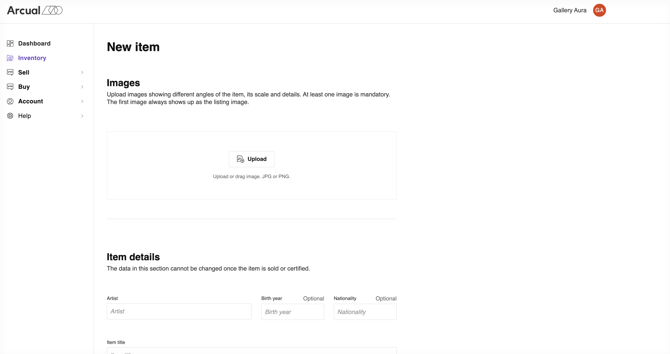
We recommend filling out additional details, including:
- **Item type**
- **Artist bio**
- **Description**
- **Inventory details**
- **Price** (If left blank, the item will display as “Price on Request” when listed on the storefront)
3\. You can modify the details of an item later by clicking the pencil icon next to the specific piece in your inventory, provided that the item has not been sold.
### To list items to your storefront:
1. Select **Storefronts** in the navigation menu.
2. Choose the relevant storefront and navigate to the **Listings** tab.
3. Click **List items** and select the items you want to list.
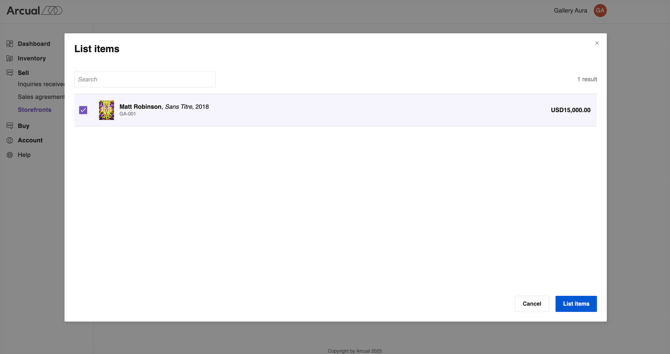
4. Click on **List items** to finalize the process.
Your item is now successfully listed in your inventory and storefront!
#### 🎥 Learn more about inventory in a recorded demo **[here](https://www.loom.com/share/d62e74b0779641dd86adff8960a0f21a?sid=9bbc6f39-e753-49fc-b913-5dae08262d76)**.
- [Storefronts for fairs](https://support.arcual.art/storefronts-for-fairs?hsLang=en#main-content)
- [About](https://support.arcual.art/storefronts-for-fairs?hsLang=en#about)
- [Storefront invitations](https://support.arcual.art/storefronts-for-fairs?hsLang=en#storefront-invitations)
- [Listings and sales](https://support.arcual.art/storefronts-for-fairs?hsLang=en#listings-and-sales)
- [Exhibitors](https://support.arcual.art/storefronts-for-fairs?hsLang=en#exhibitors)
- [Collectors](https://support.arcual.art/storefronts-for-fairs?hsLang=en#collectors)
- [Demos](https://support.arcual.art/storefronts-for-fairs?hsLang=en#demos)
- [FAQ](https://support.arcual.art/storefronts-for-fairs?hsLang=en#faq)
- [Storefronts for exhibitors](https://support.arcual.art/storefronts-for-exhibitors?hsLang=en#main-content)
- [About](https://support.arcual.art/storefronts-for-exhibitors?hsLang=en#about)
- [Storefront invitations](https://support.arcual.art/storefronts-for-exhibitors?hsLang=en#storefront-invitations)
- [Listings and sales](https://support.arcual.art/storefronts-for-exhibitors?hsLang=en#listings-and-sales)
- [Digital portfolio](https://support.arcual.art/storefronts-for-exhibitors?hsLang=en#digital-portfolio)
- [FAQ](https://support.arcual.art/storefronts-for-exhibitors?hsLang=en#faq)
- [Storefronts for galleries and artists](https://support.arcual.art/storefronts-for-galleries-and-artists?hsLang=en#main-content)
- [About](https://support.arcual.art/storefronts-for-galleries-and-artists?hsLang=en#about)
- [Listings and sales](https://support.arcual.art/storefronts-for-galleries-and-artists?hsLang=en#listings-and-sales)
- [Collectors](https://support.arcual.art/storefronts-for-galleries-and-artists?hsLang=en#collectors)
- [Demos](https://support.arcual.art/storefronts-for-galleries-and-artists?hsLang=en#demos)
- [FAQ](https://support.arcual.art/storefronts-for-galleries-and-artists?hsLang=en#faq)
- [Galleries](https://support.arcual.art/galleries?hsLang=en#main-content)
- [Arcual Platform](https://support.arcual.art/galleries?hsLang=en#arcual-platform)
- [How to](https://support.arcual.art/galleries?hsLang=en#how-to)
- [Digital Portfolio](https://support.arcual.art/galleries?hsLang=en#digital-portfolio)
- [Frequently Asked Questions](https://support.arcual.art/galleries?hsLang=en#frequently-asked-questions)
- [Artists](https://support.arcual.art/artists?hsLang=en#main-content)
- [How to](https://support.arcual.art/artists?hsLang=en#how-to)
- [Frequently Asked Questions](https://support.arcual.art/artists?hsLang=en#frequently-asked-questions)
- [Collectors](https://support.arcual.art/collectors?hsLang=en#main-content)
- [Arcual Platform](https://support.arcual.art/collectors?hsLang=en#arcual-platform)
- [How to](https://support.arcual.art/collectors?hsLang=en#how-to)
- [Storefronts](https://support.arcual.art/collectors?hsLang=en#storefronts)
- [Frequently Asked Questions](https://support.arcual.art/collectors?hsLang=en#frequently-asked-questions)
- [FAQ](https://support.arcual.art/faq?hsLang=en#main-content)
- [About Arcual](https://support.arcual.art/faq?hsLang=en#about-arcual)
- [Arcual Platform](https://support.arcual.art/faq?hsLang=en#arcual-platform)
- [Arcual Blockchain](https://support.arcual.art/faq?hsLang=en#arcual-blockchain)
- [Smart contracts](https://support.arcual.art/faq?hsLang=en#smart-contracts)
- [Payments](https://support.arcual.art/faq?hsLang=en#payments)
- [Data & Privacy](https://support.arcual.art/faq?hsLang=en#data-privacy)
## Arcual AG
Wallisellenstrasse 49, 8050 Zürich, Switzerland
Copyright © 2025, Arcual AG
[support@arcual.art](mailto:support@arcual.art) | [arcual.com](https://www.arcual.com/)