---
title: Create a certificate of authenticity
description: Learn how to create a certificate of authenticity (COA) on the Arcual platform.
---
[Skip to content](https://support.arcual.art/create-a-certificate-of-authenticity#main-content)
[](https://support.arcual.art/?hsLang=en)
Open main navigation
Close main navigation
- [Arcual.com](https://www.arcual.com/)
[Arcual.com](https://www.arcual.com/)
How can we help you?
- There are no suggestions because the search field is empty.
1. [Help Center](https://support.arcual.art/?hsLang=en)
2. [Storefronts for exhibitors](https://support.arcual.art/storefronts-for-exhibitors?hsLang=en)
3. [Digital portfolio](https://support.arcual.art/storefronts-for-exhibitors?hsLang=en#digital-portfolio)
# Create a certificate of authenticity
## Learn how to create a certificate of authenticity (COA) on the Arcual platform.
You can certify items on the platform with up to two signatures. To certify an item;
1. Open your **inventory**
2. Select the item you wish to certify
3. On the item details page, under the digital portfolio section, click **certify**
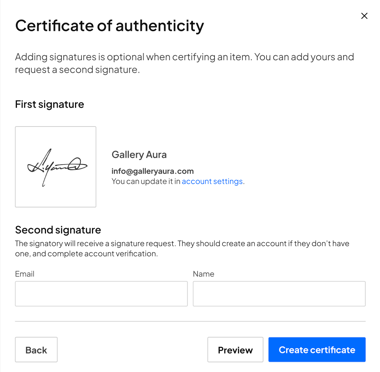
To certify;
1. 1. **Without a signature**
1. On the certification popup, click **next** and **create certificate** to certify the item without any signatures.
2. **With only your signature**
1. On the certification popup, **add** your signature and click **next**
2. Click **create certificate.**
3. **With a second signature**
1. On the certification popup, **add** your signature and click **next**
2. Request a second signature by entering the email and name of the signatory
3. Click **create certificate** to send the request. The signatory will receive an email with your request, and you will be notified when they sign the document or decline the request.
Currently, the certificates are saved on the Arcual platform. Our team is working hard to bring the **Arcual Blockchain** to life. All certificates will be secured on the blockchain as soon as the feature connection is ready.
Learn more about how to find your certificates [**here**](https://support.arcual.art/find-certificates-of-authenticity-coa?hsLang=en).
- [Storefronts for fairs](https://support.arcual.art/storefronts-for-fairs?hsLang=en#main-content)
- [About](https://support.arcual.art/storefronts-for-fairs?hsLang=en#about)
- [Storefront invitations](https://support.arcual.art/storefronts-for-fairs?hsLang=en#storefront-invitations)
- [Listings and sales](https://support.arcual.art/storefronts-for-fairs?hsLang=en#listings-and-sales)
- [Exhibitors](https://support.arcual.art/storefronts-for-fairs?hsLang=en#exhibitors)
- [Collectors](https://support.arcual.art/storefronts-for-fairs?hsLang=en#collectors)
- [Demos](https://support.arcual.art/storefronts-for-fairs?hsLang=en#demos)
- [FAQ](https://support.arcual.art/storefronts-for-fairs?hsLang=en#faq)
- [Storefronts for exhibitors](https://support.arcual.art/storefronts-for-exhibitors?hsLang=en#main-content)
- [About](https://support.arcual.art/storefronts-for-exhibitors?hsLang=en#about)
- [Storefront invitations](https://support.arcual.art/storefronts-for-exhibitors?hsLang=en#storefront-invitations)
- [Listings and sales](https://support.arcual.art/storefronts-for-exhibitors?hsLang=en#listings-and-sales)
- [Digital portfolio](https://support.arcual.art/storefronts-for-exhibitors?hsLang=en#digital-portfolio)
- [FAQ](https://support.arcual.art/storefronts-for-exhibitors?hsLang=en#faq)
- [Storefronts for galleries and artists](https://support.arcual.art/storefronts-for-galleries-and-artists?hsLang=en#main-content)
- [About](https://support.arcual.art/storefronts-for-galleries-and-artists?hsLang=en#about)
- [Listings and sales](https://support.arcual.art/storefronts-for-galleries-and-artists?hsLang=en#listings-and-sales)
- [Collectors](https://support.arcual.art/storefronts-for-galleries-and-artists?hsLang=en#collectors)
- [Demos](https://support.arcual.art/storefronts-for-galleries-and-artists?hsLang=en#demos)
- [FAQ](https://support.arcual.art/storefronts-for-galleries-and-artists?hsLang=en#faq)
- [Galleries](https://support.arcual.art/galleries?hsLang=en#main-content)
- [Arcual Platform](https://support.arcual.art/galleries?hsLang=en#arcual-platform)
- [How to](https://support.arcual.art/galleries?hsLang=en#how-to)
- [Digital Portfolio](https://support.arcual.art/galleries?hsLang=en#digital-portfolio)
- [Frequently Asked Questions](https://support.arcual.art/galleries?hsLang=en#frequently-asked-questions)
- [Artists](https://support.arcual.art/artists?hsLang=en#main-content)
- [How to](https://support.arcual.art/artists?hsLang=en#how-to)
- [Frequently Asked Questions](https://support.arcual.art/artists?hsLang=en#frequently-asked-questions)
- [Collectors](https://support.arcual.art/collectors?hsLang=en#main-content)
- [Arcual Platform](https://support.arcual.art/collectors?hsLang=en#arcual-platform)
- [How to](https://support.arcual.art/collectors?hsLang=en#how-to)
- [Storefronts](https://support.arcual.art/collectors?hsLang=en#storefronts)
- [Frequently Asked Questions](https://support.arcual.art/collectors?hsLang=en#frequently-asked-questions)
- [FAQ](https://support.arcual.art/faq?hsLang=en#main-content)
- [About Arcual](https://support.arcual.art/faq?hsLang=en#about-arcual)
- [Arcual Platform](https://support.arcual.art/faq?hsLang=en#arcual-platform)
- [Arcual Blockchain](https://support.arcual.art/faq?hsLang=en#arcual-blockchain)
- [Smart contracts](https://support.arcual.art/faq?hsLang=en#smart-contracts)
- [Payments](https://support.arcual.art/faq?hsLang=en#payments)
- [Data & Privacy](https://support.arcual.art/faq?hsLang=en#data-privacy)
## Arcual AG
Wallisellenstrasse 49, 8050 Zürich, Switzerland
Copyright © 2025, Arcual AG
[support@arcual.art](mailto:support@arcual.art) | [arcual.com](https://www.arcual.com/)