---
title: Join a storefront with an existing Arcual account
description: Exhibitors with an existing Arcual account can join a storefront by following the invitation link sent by the fair or by using the invitation code provided in the email.
---
[Skip to content](https://support.arcual.art/join-a-storefront-with-an-existing-arcual-account#main-content)
[](https://support.arcual.art/?hsLang=en)
Open main navigation
Close main navigation
- [Arcual.com](https://www.arcual.com/)
[Arcual.com](https://www.arcual.com/)
How can we help you?
- There are no suggestions because the search field is empty.
1. [Help Center](https://support.arcual.art/?hsLang=en)
2. [Storefronts for exhibitors](https://support.arcual.art/storefronts-for-exhibitors?hsLang=en)
3. [Storefront invitations](https://support.arcual.art/storefronts-for-exhibitors?hsLang=en#storefront-invitations)
# Join a storefront with an existing Arcual account
## Exhibitors with an existing Arcual account can join a storefront by following the invitation link sent by the fair or by using the invitation code provided in the email.
#### **Joining with an Invitation Link**
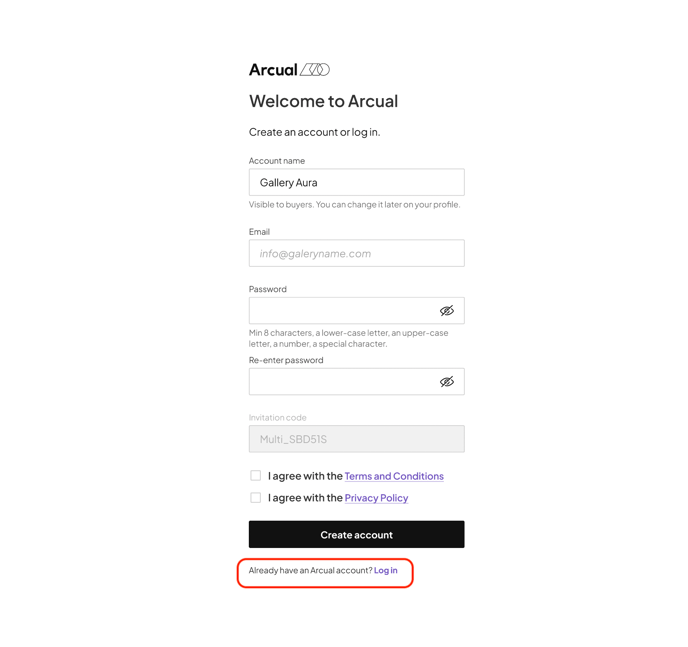
1. Follow the invitation link sent by the fair. You will land on the registration page. Instead of filling out the information, select **Log In** at the bottom of the page. (See Image a)
a)
2. After logging in, return to the email you received and follow the invitation link again. Now that you are logged in, the link will direct you to the Storefront page.
b)
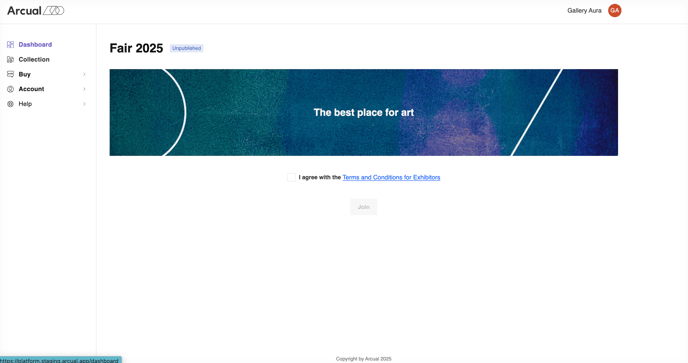
3. To complete the process, review and accept the **Terms & Conditions** and **Privacy Policy**, then select **Join**.
c)
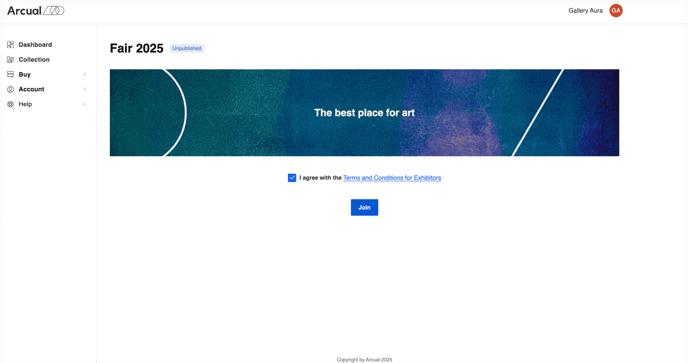
4. You have successfully joined the Storefront.
#### **Joining with an Invitation Code**
If you are already logged into your Arcual account, you can use the invitation code provided in the fair's email instead of following the invitation link.
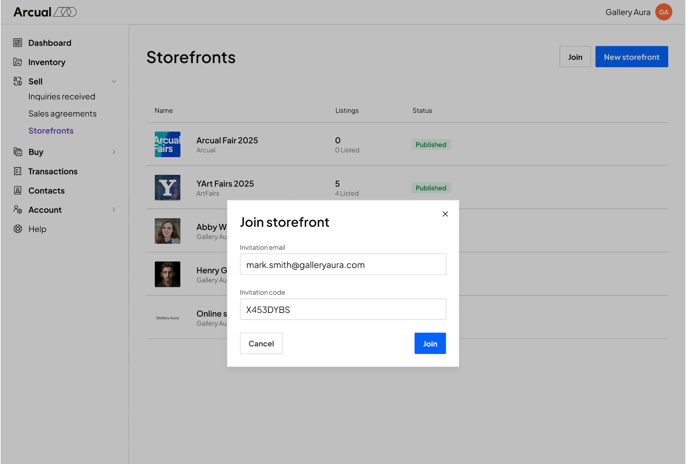
1. Go to the **Sell** section in the menu and select **Storefront**.
a)

2. At the top of the page, select the **Join** button. A pop-up screen will appear. Enter the email address where you received the invitation and the **invitation code** from the email. Then, select **Join** to proceed.
b)
3. You will be directed to the Storefront page. Accept the **Terms & Conditions** and **Privacy Policy**, then select **Join**.
c)

4. You have successfully joined the Storefront.
If you encounter any issues, please ensure you are logged into the correct Arcual account and that the invitation code matches the one provided in the email. With any additional questions please contact **support@arcual.art.**
- [Storefronts for fairs](https://support.arcual.art/storefronts-for-fairs?hsLang=en#main-content)
- [About](https://support.arcual.art/storefronts-for-fairs?hsLang=en#about)
- [Storefront invitations](https://support.arcual.art/storefronts-for-fairs?hsLang=en#storefront-invitations)
- [Listings and sales](https://support.arcual.art/storefronts-for-fairs?hsLang=en#listings-and-sales)
- [Exhibitors](https://support.arcual.art/storefronts-for-fairs?hsLang=en#exhibitors)
- [Collectors](https://support.arcual.art/storefronts-for-fairs?hsLang=en#collectors)
- [Demos](https://support.arcual.art/storefronts-for-fairs?hsLang=en#demos)
- [FAQ](https://support.arcual.art/storefronts-for-fairs?hsLang=en#faq)
- [Storefronts for exhibitors](https://support.arcual.art/storefronts-for-exhibitors?hsLang=en#main-content)
- [About](https://support.arcual.art/storefronts-for-exhibitors?hsLang=en#about)
- [Storefront invitations](https://support.arcual.art/storefronts-for-exhibitors?hsLang=en#storefront-invitations)
- [Listings and sales](https://support.arcual.art/storefronts-for-exhibitors?hsLang=en#listings-and-sales)
- [Digital portfolio](https://support.arcual.art/storefronts-for-exhibitors?hsLang=en#digital-portfolio)
- [FAQ](https://support.arcual.art/storefronts-for-exhibitors?hsLang=en#faq)
- [Storefronts for galleries and artists](https://support.arcual.art/storefronts-for-galleries-and-artists?hsLang=en#main-content)
- [About](https://support.arcual.art/storefronts-for-galleries-and-artists?hsLang=en#about)
- [Listings and sales](https://support.arcual.art/storefronts-for-galleries-and-artists?hsLang=en#listings-and-sales)
- [Collectors](https://support.arcual.art/storefronts-for-galleries-and-artists?hsLang=en#collectors)
- [Demos](https://support.arcual.art/storefronts-for-galleries-and-artists?hsLang=en#demos)
- [FAQ](https://support.arcual.art/storefronts-for-galleries-and-artists?hsLang=en#faq)
- [Galleries](https://support.arcual.art/galleries?hsLang=en#main-content)
- [Arcual Platform](https://support.arcual.art/galleries?hsLang=en#arcual-platform)
- [How to](https://support.arcual.art/galleries?hsLang=en#how-to)
- [Digital Portfolio](https://support.arcual.art/galleries?hsLang=en#digital-portfolio)
- [Frequently Asked Questions](https://support.arcual.art/galleries?hsLang=en#frequently-asked-questions)
- [Artists](https://support.arcual.art/artists?hsLang=en#main-content)
- [How to](https://support.arcual.art/artists?hsLang=en#how-to)
- [Frequently Asked Questions](https://support.arcual.art/artists?hsLang=en#frequently-asked-questions)
- [Collectors](https://support.arcual.art/collectors?hsLang=en#main-content)
- [Arcual Platform](https://support.arcual.art/collectors?hsLang=en#arcual-platform)
- [How to](https://support.arcual.art/collectors?hsLang=en#how-to)
- [Storefronts](https://support.arcual.art/collectors?hsLang=en#storefronts)
- [Frequently Asked Questions](https://support.arcual.art/collectors?hsLang=en#frequently-asked-questions)
- [FAQ](https://support.arcual.art/faq?hsLang=en#main-content)
- [About Arcual](https://support.arcual.art/faq?hsLang=en#about-arcual)
- [Arcual Platform](https://support.arcual.art/faq?hsLang=en#arcual-platform)
- [Arcual Blockchain](https://support.arcual.art/faq?hsLang=en#arcual-blockchain)
- [Smart contracts](https://support.arcual.art/faq?hsLang=en#smart-contracts)
- [Payments](https://support.arcual.art/faq?hsLang=en#payments)
- [Data & Privacy](https://support.arcual.art/faq?hsLang=en#data-privacy)
## Arcual AG
Wallisellenstrasse 49, 8050 Zürich, Switzerland
Copyright © 2025, Arcual AG
[support@arcual.art](mailto:support@arcual.art) | [arcual.com](https://www.arcual.com/)